
Content and playlists
Put the content you already have on every screen
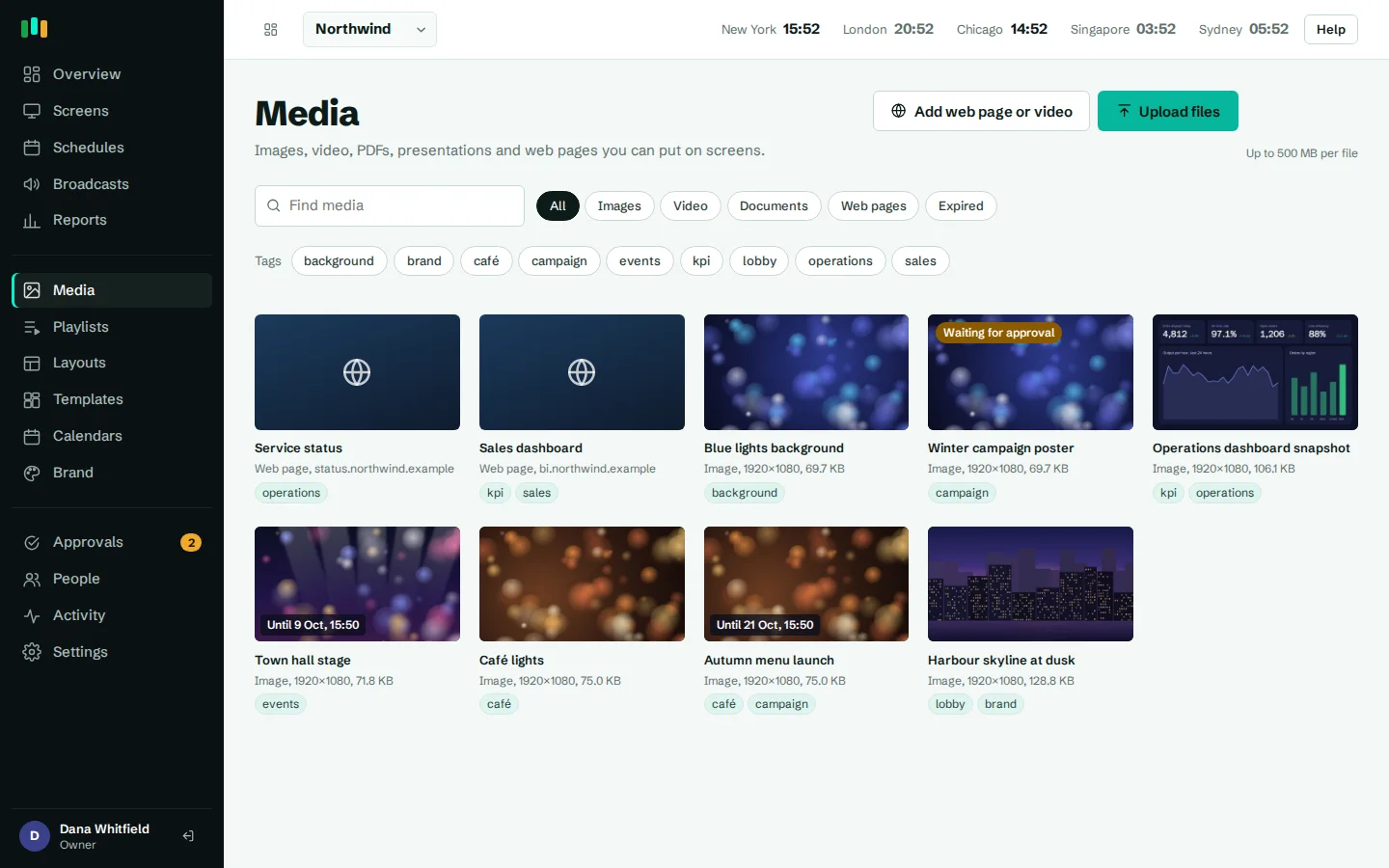
Drag in the files your team already makes, add web pages and video links, and arrange them into playlists. CompleteVantage converts, stores and plays them, and takes items off screen when they expire.
Most formats, no rework
Images, video, PDF and PowerPoint upload as they are. Slides and pages are converted for you.
Live pages and streams
Show web pages, HTML snippets, YouTube videos and HLS live streams alongside your files.
Playlists in minutes
Drag items into order, set how long each one shows and pick a transition.
Content that expires
Give any item a show-from and show-until date and it appears and disappears on time, even offline.
Digital signage content management without file wrangling
Drop files onto the media library and watch the upload progress. CompleteVantage tidies file names into readable titles, makes thumbnails and prepares each file for the screen.
- PowerPoint decks are converted into slide images, so a TV never needs Office installed.
- PDFs become one image per page, handy for rotas, notices and menus.
- Video plays from the screen's local cache, so it doesn't stutter on a slow connection.
- Images show full screen or inside a zone of a layout.
- Images and video
- PDF, one page per slide
- PowerPoint, converted to slide images
- Drag-and-drop uploads with progress
Web pages, HTML snippets, YouTube and live streams
Not everything is a file. Choose Add web page or video to add:
- Web pages such as a status page, an intranet news page or a live report. Set a reload interval and a zoom level so small text reads from across the room. Pages that need a key can carry it safely: see dashboards.
- HTML snippets for a small embed or a custom notice.
- YouTube videos, Shorts, playlists and live streams. They play muted unless you turn on sound, and a broken video is skipped in a playlist rather than leaving a blank screen.
- Streams in HLS (
.m3u8) or a direct.mp4link, for a live camera feed or a broadcast channel.
Screens need an internet connection for web pages, YouTube and streams. Uploaded files play from the local cache.
Playlists with durations and transitions
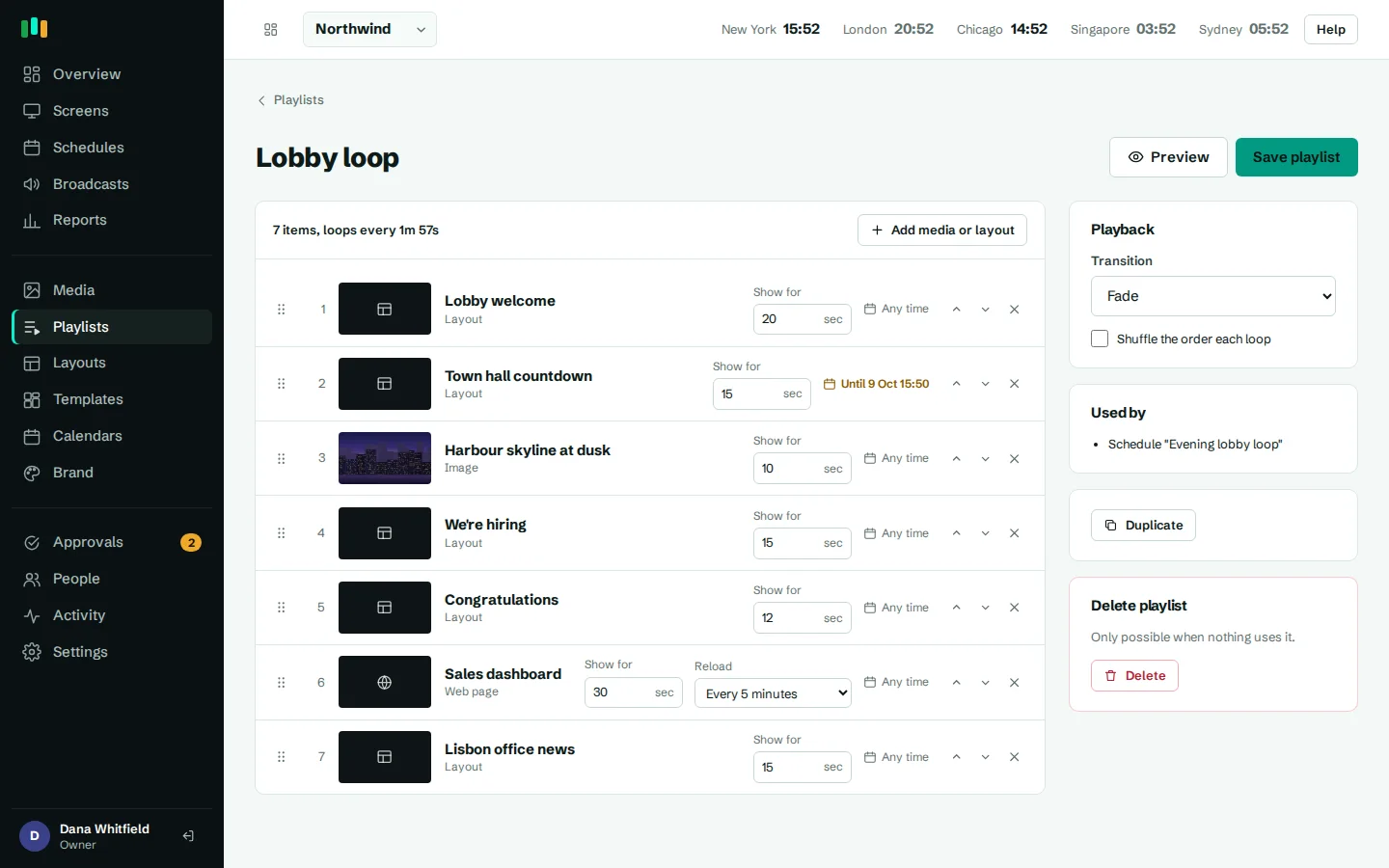
A playlist is an ordered list of items. Drag to reorder, set a duration for each item, and choose a fade, slide or cut transition. Turn on shuffle when the order doesn't matter, such as a loop of team photos.
Playlists can hold media and layouts, so a reception loop might run a welcome layout for 20 seconds, then a promo video, then a PDF of today's events. Assign the playlist to a screen or group, or use it in a schedule.
- Drag to reorder items
- Duration per item, with an optional reload interval
- Fade, slide or cut transitions
- Shuffle for loops where order doesn't matter
Show from and show until dates
Every media item, and every slot in a playlist, can have a show from and show until date and time, typed in your organization's time zone. A spring promotion can go live at 09:00 on the 1st and disappear at midnight on the 30th without anyone logging in.
The player enforces these windows itself. If a screen is offline when an item expires, it still stops showing it on time. The media library marks items as Expired, Starts or Until, and an Expired filter helps you clean up old content.
Tags to keep a growing library findable
Add comma-separated tags such as lobby, q3-campaign or safety. Tags appear as filter chips in the media library and are searchable, so a team of editors can find the right file in a library of hundreds.
If you want a review step before anything reaches a screen, turn on approvals: editors' uploads and playlist changes wait until an admin approves them.
Questions people ask
Do I need to convert PowerPoint files before uploading?
No. Upload the .pptx and CompleteVantage converts it to slide images on the server. Animations and embedded video in the deck are not carried over, so upload videos separately.
Will videos play if the internet is slow?
Yes. Uploaded videos and images are downloaded to the screen and play from its cache. Only web pages, YouTube and streams need a live connection.
Can content expire automatically?
Yes. Set a show-until date on the media item or on a single playlist slot. The screen removes it on time, even if it is offline.
Can YouTube videos play with sound?
They play muted by default. Turn on Play sound for the item and it plays with sound in the Android app.
Can I show a web page that needs a login?
If the page accepts a key in the URL or an HTTP header, yes. Pages that require an interactive sign-in are not supported. See dashboards.
Related features
- Designer and templatesStart from a designed template or build your own layout, previewed exactly as the TV will show it.
- SchedulingPlan what plays by day, time and place, and let each screen follow its own local clock.
- Offline playbackScreens keep playing, and keep following their schedules, when the internet or the server is down.
- DashboardsShow live web dashboards and KPI reports on TVs, with access keys kept out of sight.
Put your first screen on in ten minutes
Try every feature free for 14 days. No card required. Pair a TV with a six-character code, pick a template, and it's live.