
CompleteVantage is priced per screen. Your plan, or your free trial, also sets how many screens, how much storage and how many people your organization can have, and which features are included. This article explains what counts and where to check it.
You pay per paired screen
- A plan has a price per screen, charged every month or every year, for example "£12.00 per screen a month". Current prices are on the pricing page of the CompleteVantage website.
- A screen counts once it's paired to your organization. Screens that are only showing a pairing code don't count.
- The number of screens you pay for follows your paired screens. Pair a screen and it's added; remove one and it drops off. The change is picked up within about an hour and shows on your next invoice.
- You always pay for at least one screen while you have a plan.
What limits can apply
| Limit | What counts |
|---|---|
| Screens | Screens paired to your organization. |
| Storage | Your uploaded files, plus an estimate for converted slides and thumbnails. Web pages and YouTube links take no space. |
| People | Everyone in your organization under People, whatever their role. |
| Features | Content approval, Live view, Calendars and Reports can depend on your plan. |
Everything else is included on every plan: screens and groups, media, playlists, layouts and templates, the brand kit, schedules, broadcasts, display hours and alerts. Each file you upload can be up to 500 MB.
See what you use
Admins and owners can open Usage at the bottom of the menu.
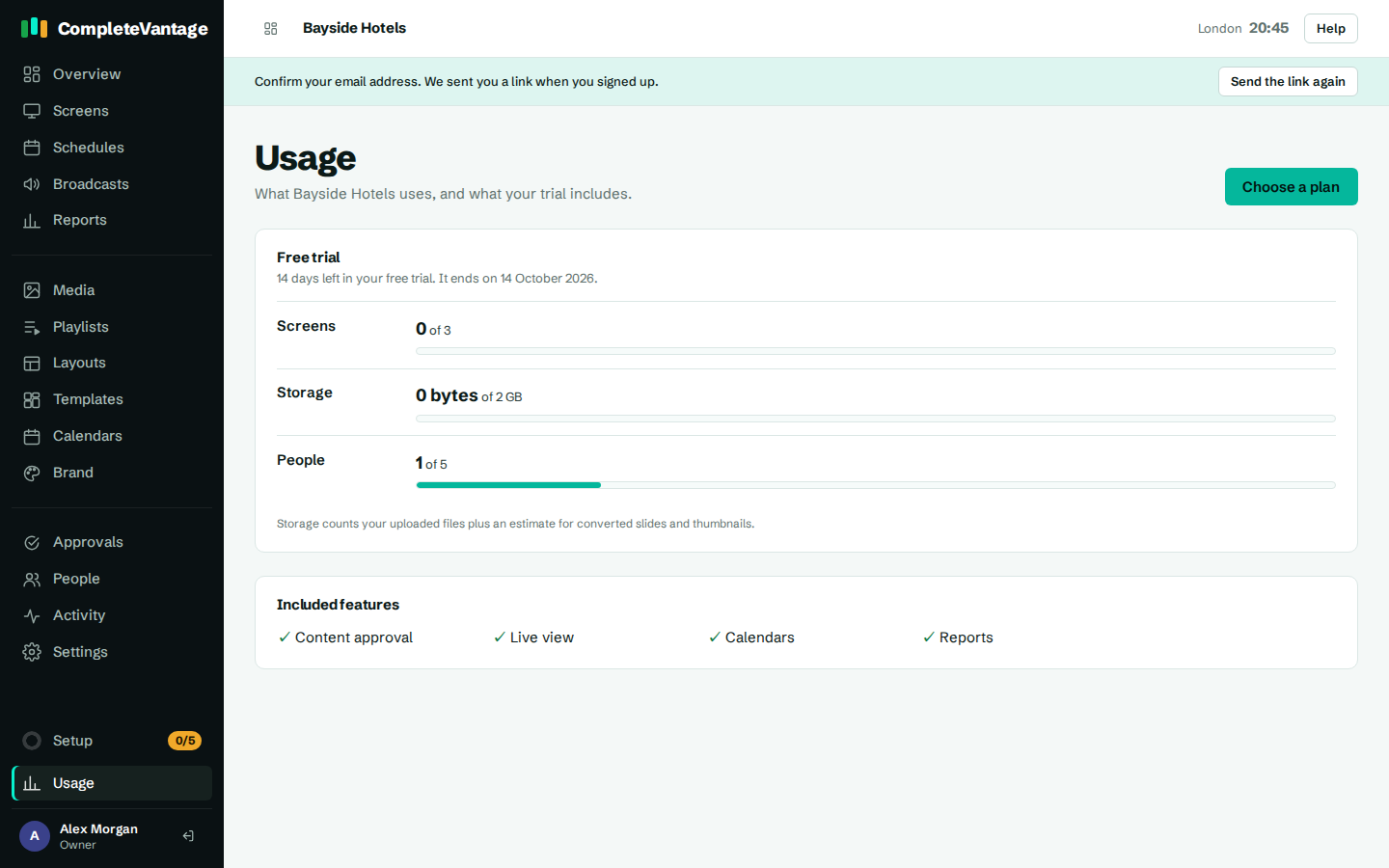
- The top of the page names your plan, or Free trial, with the days left.
- Screens, Storage and People show what you use and your limit, for example "2 of 3". A bar shows how full each one is, and the page says At the limit when you reach it.
- Included features ticks the features your plan includes.
If your organization has no limits, for example an internal account, the page says "No limits apply to this organization."
When you reach a limit
Nothing stops working. You just can't add more until you make room or change plan. The message tells you which limit you hit:
- Pairing a screen: "Your free trial includes 3 screens, and they're all paired. Remove a screen, or choose a plan with more screens under Billing."
- Uploading a file: the message says how big the file is and how much storage is left. Delete media you no longer use, or choose a bigger plan.
- Adding a person: "Your plan includes 5 people, and that's everyone. Remove someone, or choose a bigger plan under Billing."
- Using a feature your plan doesn't include: the page says, for example, Live view isn't included in your plan. Everything you've already set up keeps working.
Only owners can change the plan. Admins see See your plan instead of Choose a plan.
Plan status
Owners see the status on the Billing page, under Your plan.

| Status | Meaning |
|---|---|
| No plan | No plan chosen yet. |
| Free trial | You're trying CompleteVantage. |
| Active | Your plan is paid and running. |
| Payment overdue | The last payment failed. Update your card. |
| Canceled | The plan has ended. |