
The countdown widget shows how long is left until a moment you choose, such as an event opening or a product launch. When the time comes, it shows your own message instead.
You'll need: the editor role or higher.
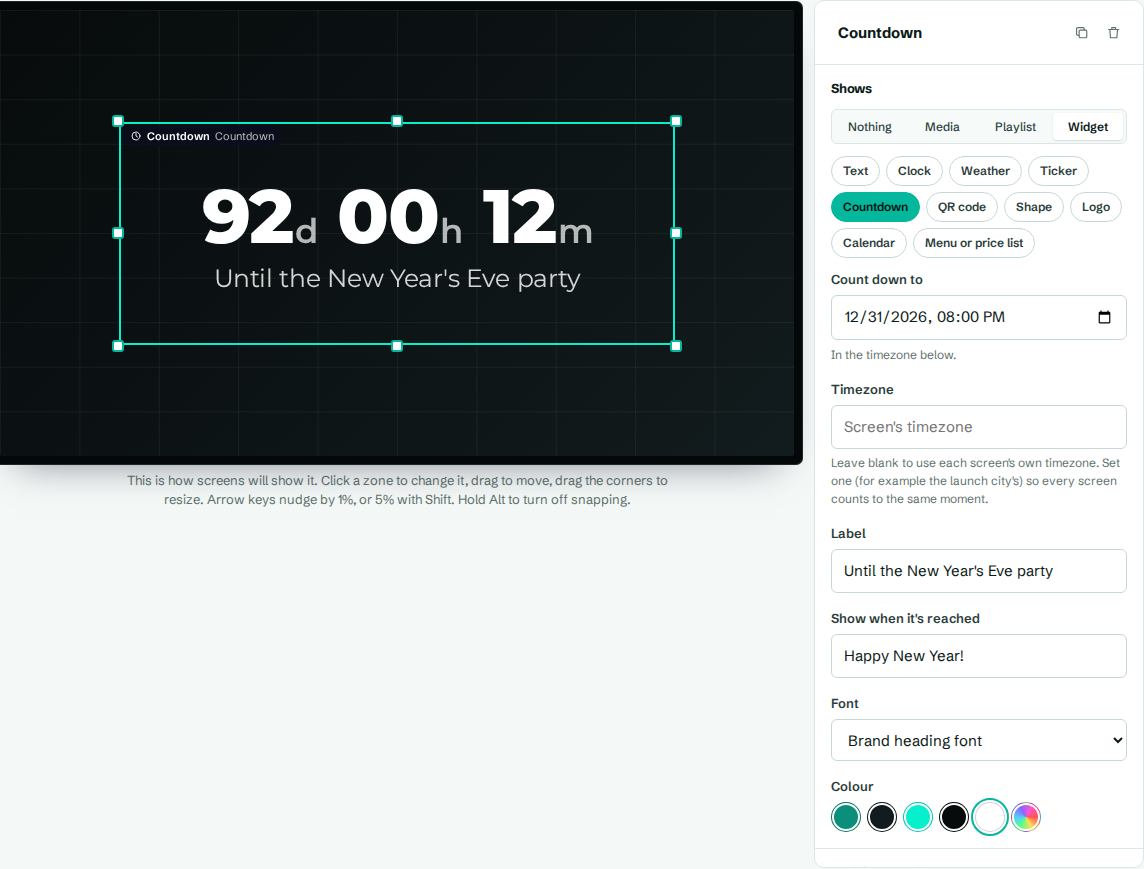
Add a countdown
- In the designer, select a zone.
- Under Shows, choose Widget, then Countdown.
- Set Count down to, and the other settings.
- Select Save layout.
Settings
| Setting | What it does |
|---|---|
| Count down to | The date and time to count down to. It's in each screen's own timezone. |
| Label | Text under the numbers, like "Until the summer party". |
| Show when it's reached | What to show once the time has passed, like "It's here" or "Doors are open". |
| Font | A brand font or a specific font. |
| Colour | Colour of the numbers and label. |
What it shows
- More than a day away: days, hours and minutes, like 12d 04h 30m.
- Less than a day away: hours, minutes and seconds, like 04h 30m 12s.
- Time reached: the text from Show when it's reached.
- No date set: Set a date.
The Event spotlight template in Events has a countdown ready to use.