
The text widget shows words: a heading, a notice, a bullet or numbered list, or a small label. It uses your brand fonts by default and sizes itself to its zone.
You'll need: the editor role or higher.
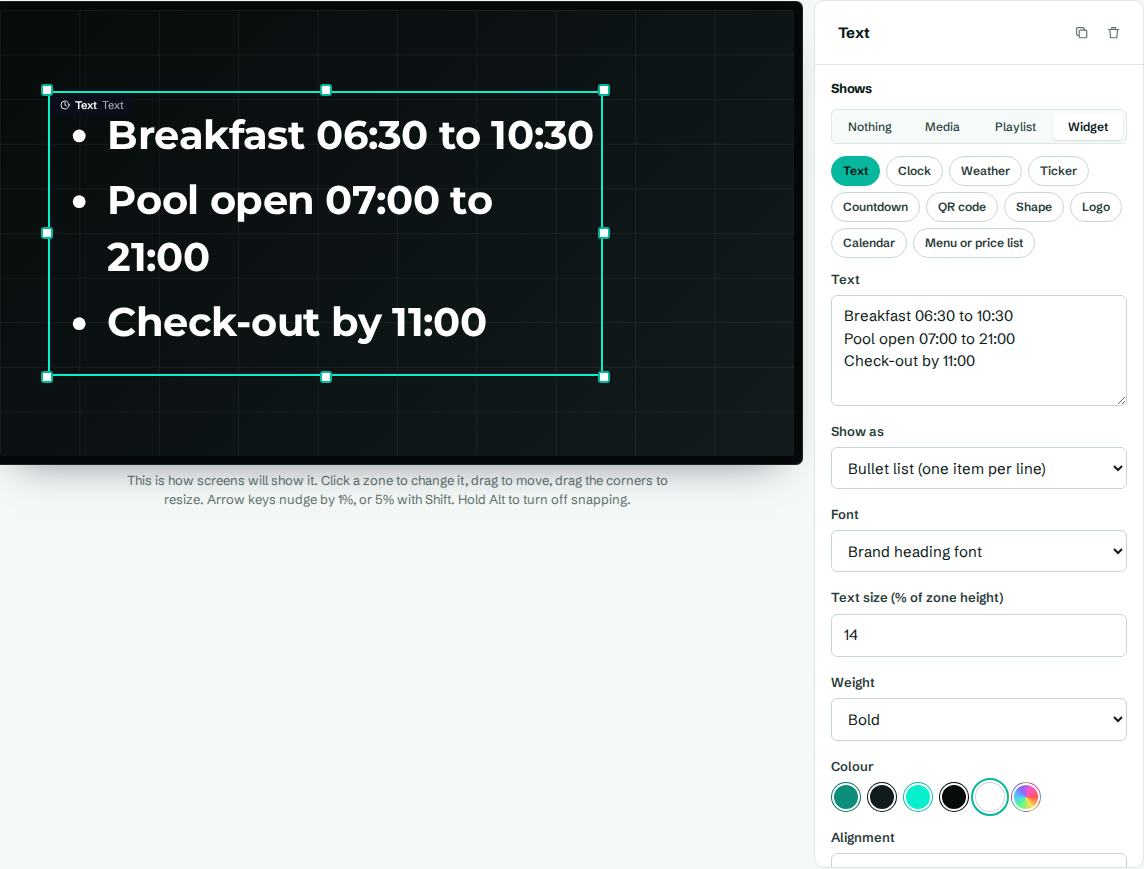
Add text
- In the designer, select a zone (or Add zone).
- Under Shows, choose Widget, then Text.
- Type your words in Text. Press Enter for a new line.
- Adjust the settings below, then select Save layout.
Settings
| Setting | What it does |
|---|---|
| Text | The words to show. New lines are kept. |
| Show as | Plain text, Bullet list (one item per line) or Numbered list (one item per line). In a list, each line becomes one item and empty lines are skipped. |
| Font | Brand heading font, Brand body font, or a specific font. Brand fonts follow your brand kit. |
| Text size (% of zone height) | How tall the text is, from 1 to 100. At 8, each line is about 8% of the zone's height. |
| Weight | Regular, Medium, Semibold, Bold, Heavy or Black. |
| Colour | A brand colour or a custom colour. |
| Alignment | Left, Centre or Right. |
| Vertical position | Top, Middle or Bottom of the zone. |
| Letters | As typed, or ALL CAPITALS. Capitals are applied on screen, so your text stays easy to edit. |
| Italic | Slants the text. |
| Line spacing | Space between lines, from 0.7 to 3. 1.15 is the default. Use about 1.4 for lists and paragraphs. |
| Letter spacing | Space between letters, from -10 to 50. Small positive values, like 8, suit short capitalised labels. |
How text sizes itself
Text size is a share of the zone's height, not a fixed number of pixels. So the same layout looks right on a 1080p TV and a 4K TV.
If the text is too long for the zone, the widget shrinks it until it fits. It never grows past the size you set. So when a heading looks smaller than expected, the zone is too small for it: make the zone bigger or shorten the text.
Examples
- A small label above a heading: text "Welcome to", Letters set to ALL CAPITALS, Letter spacing 15, Weight Semibold, colour Accent.
- A list of guest names: Show as Bullet list (one item per line), one name per line.